Showing posts with label blogger tricks. Show all posts

Friday, September 28, 2012

What Is Blogging Platform why do we needed

No comments:

Blogging Platform is the easiest way to create your website without knowledge of html,css or any other language.Blogging platforms are have both user interface and code interface in their system.It is small Cms(Content Management System) Which gives you power to publish your website as same way as another Website.The latest Blogging platforms  designed in such way by only simple clicks you can develop your fresh and attractive website which we needed.Blogging Platform not only secure your website but enhance your writing by in-built type writing tools .

By the growth of internet the technology is also increased in same way and there users also. To earn through internet is  the main motive of the users and to fulfill it cms are designed.Some blogging platform are free some of them want host and the driven database.Each blogging platform is different from other.Here is the some latest and widely used blogging platform.

Blogger:                                                      

                                                                                                                                          Blogger- Create your free Blog

Blogger is the Google free blogging platform hosted on the Google servers.Blogger is the simple and reliable tools for your post management and it have many options to design your own template in the same way another website.It have many Seo options to customize your search index in Google, Yahoo,Bing and by the release of the 2011 Features it became as the full seo optimized Cms.Blogger gives an option to create new widgets with the help of JQERY,AJAX,RSS,HTML,JAVASCRIPT and many other technologies to represent the website in very unique way.Blogger have inbuilt post system in which you have to write content and publish it

WordPress:       

                                                                                                                                         WordPress › Blog Tool, Publishing Platform, and CMS

This is the free platform  designed in PHP technologies so it is A Script which you have to upload it in your own server to Use it.Wordpress is the largest used blogging platform which is inbuilt with many unbelievable features.Wordpress have many complications while editing your template you have the basic knowledge of PHP.Wordpress is an ideal platform which gives complete Seo Option to get indexed in Search engines.Wordpress is the script so it have many plug-in to enhance your writing and publishing.Wordpress is the platform which came with registration option so that you can encourage writers to write on your website.

Tumblr:         

                                                                                                                                                                                                              Tumblr

Tumblr is very simple and  easiest micro blogging platform as Twitter.You just have to sign up the registration form to start the blogging. Tumblr having many advanced and cool features it built . Tumblr is very different form many other blogging platform it is just like Social Networking or micro blogging website.

Drupal:

Drupal - Open Source CMS - drupal.org

Drupal is the famous blogging platform and Cms  which  used by many developers and coders to developing a website . Drupal is came with many amazing features which gives more power to develop a CMS.
Continue Reading...

Friday, September 21, 2012

How To submit Blog to Technorati Blog Directory

No comments:


Technorati is the first blog directory  introduced by Dave Sifry to help bloggers to submit there website where.Visitors can read there blog.Tecnorati provide the information about the all tech content also.Tecnorati also help by indexing the website which have great content by ranking them in there database.Technorati is now is the one of the top 10 directory where millions of blog/websites are indexing.Technorati is also highest traffic driven website and you can also get some quite traffic by submitting your blog/website.To submit in the Technorati is not typical task but for newbies it is quite typical.So here your search ends How to submit blog or directory to the Technorati
Step-1 Go to the official website and register your self,
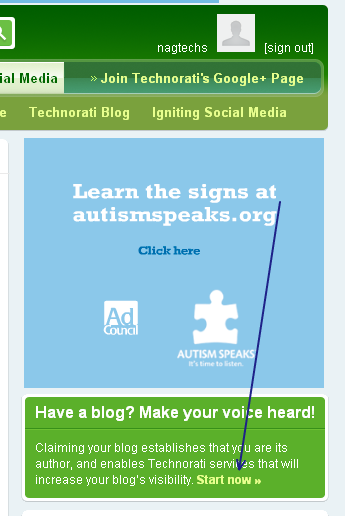
fill all the details correctly.log-in the Technorati if you have successfully login then you will find window as shown in screenshot.
 how to submit bblog to technorati
Step-2 Claiming Your blog/website
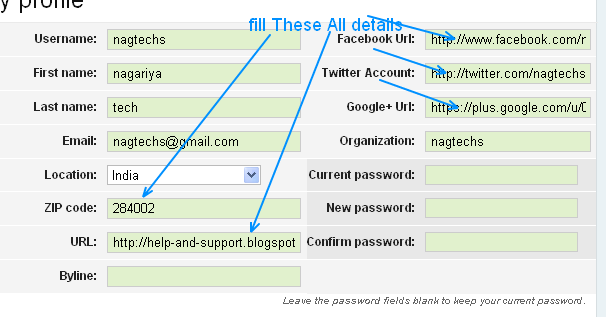
when this got true then click on the start now link to claiming your blog in Technorati and you will gone to the profile page of the Technorati account where you have to insert all the fields which are given such as your Facebook url,twitter url, g+ posts url and many other details and update it as shown in screenshot.
update of profile in technorat
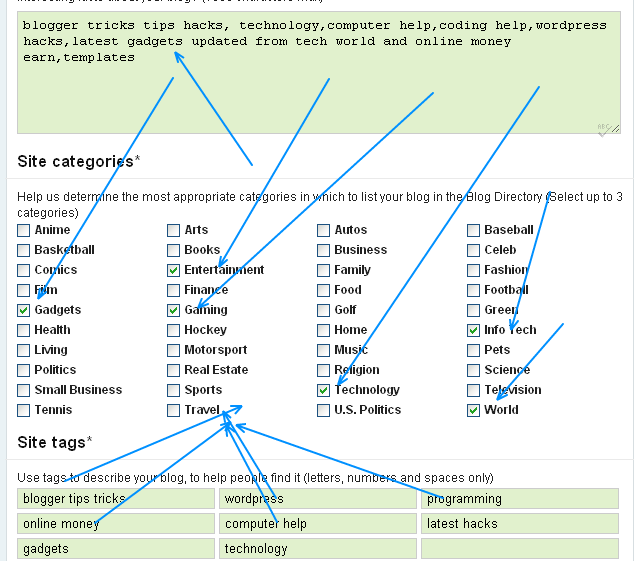
Step-3 Add the Category

add the token
In this category you have to update your description and site categories and the site tags add it.click on proceed to the next step and you will get success page that all your information has been successfully edit now go to your email account there is mail to go ahead next step.
Step-4 Add the claim token
To add the claim token simply add in the any of your post.When feed of your blog will update and when Technorati crawl your feed and find that token your blog/website will successfully claimed. Same as mine ATAYAY86JEW2.
if you have any problem related to the claiming Discuss in the comment form thankyou

Continue Reading...

Thursday, September 6, 2012

How to Optimize Your Blogger For adsense

No comments:
As you know that Google adsense is the world largest online advertising programe for the advertisers and as well as the publishers but the main thing came behind that how to earn money more and more so here are some triks by which you can optimize your blog for the adsense 

1.Show the Adsense in Post

Whille writing the post you will find this option in the post edit option 
what you have to do.
goto the blogger homepage and lick on drop down menu


their you will find the option of layout and now go through it their you will
find the option of post appearing option and which will like this as shown in screen shot


now click on Edit link their you have to enable the adsense option 
as shown in screenshot


 click on the check box and save it if your adsense account is approved the you will see the  live adsense below the post title 

2.By choosing Color from your Website 
if your adsense account is approved then you have the option how will the color of your ads and what is the dimension of the ads in the color option fill the appropriate colour in adsense ads

Continue Reading...
 

Follow On Facebook

Twitter Updates