Showing posts with label webdirectory. Show all posts

Monday, October 1, 2012

Twitter Introduced People Directory As Fb

No comments:

                                     Twitter - Profiles Directory - a - azzzzzzzzzzzzzzzzzzz 

Twitter has introduced a  profiles directory where all the  profiles are indexed in alphabetically order.Facebook has also introduced People  directory in which you will be able to find anyone who have register on Face book.Twitter directory not only help users to find the people more quickly but it allows search engines to index those profiles publically. 

Twitter don’t have the option to find this name by searching baecause search form is not added so it may be difficult to find it through directory there is another option which allows you to find the people with the help of Google you just have to paste the below code and enter search button.

Twitter directory has navigated this directory in alphabatically and in Non-Latin character names.

Link for the Twitter Directory
Continue Reading...

Friday, September 21, 2012

How To submit Blog to Technorati Blog Directory

No comments:


Technorati is the first blog directory  introduced by Dave Sifry to help bloggers to submit there website where.Visitors can read there blog.Tecnorati provide the information about the all tech content also.Tecnorati also help by indexing the website which have great content by ranking them in there database.Technorati is now is the one of the top 10 directory where millions of blog/websites are indexing.Technorati is also highest traffic driven website and you can also get some quite traffic by submitting your blog/website.To submit in the Technorati is not typical task but for newbies it is quite typical.So here your search ends How to submit blog or directory to the Technorati
Step-1 Go to the official website and register your self,
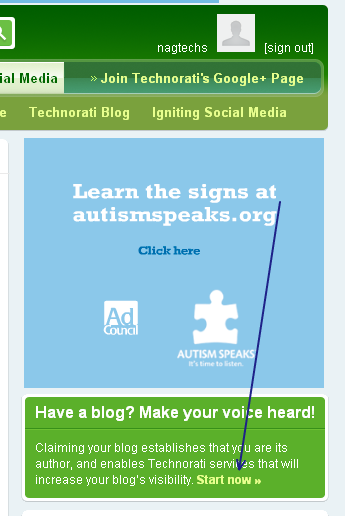
fill all the details correctly.log-in the Technorati if you have successfully login then you will find window as shown in screenshot.
 how to submit bblog to technorati
Step-2 Claiming Your blog/website
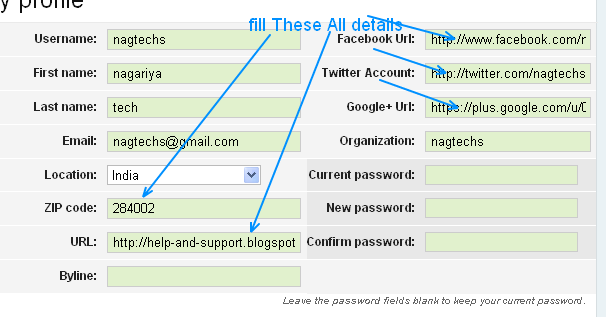
when this got true then click on the start now link to claiming your blog in Technorati and you will gone to the profile page of the Technorati account where you have to insert all the fields which are given such as your Facebook url,twitter url, g+ posts url and many other details and update it as shown in screenshot.
update of profile in technorat
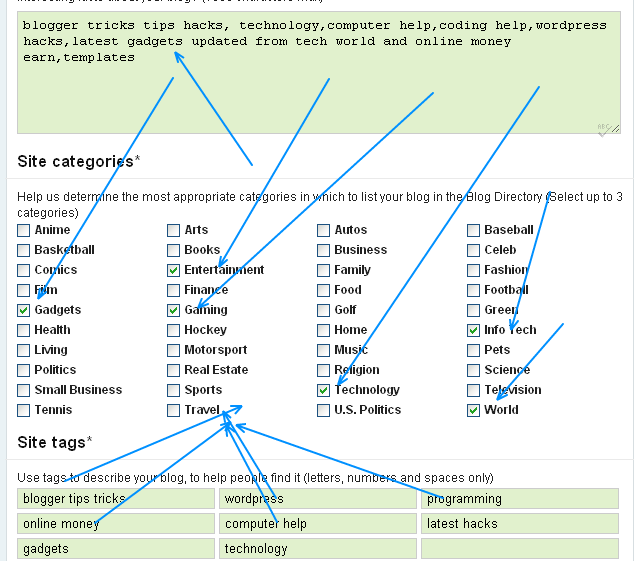
Step-3 Add the Category

add the token
In this category you have to update your description and site categories and the site tags add it.click on proceed to the next step and you will get success page that all your information has been successfully edit now go to your email account there is mail to go ahead next step.
Step-4 Add the claim token
To add the claim token simply add in the any of your post.When feed of your blog will update and when Technorati crawl your feed and find that token your blog/website will successfully claimed. Same as mine ATAYAY86JEW2.
if you have any problem related to the claiming Discuss in the comment form thankyou

Continue Reading...

Friday, September 7, 2012

how to submit blog to dmoz

No comments:


As dmoz is largest human edited web directory project and you all might pleased to know if your blog or website is came in the dmoz directory then you will get high ranked in the alexa and not only alexa but Google rankings or serp will highly ranked if the dmoz accept your request then you will get more visitors also because of your high ranking  now i am telling how to submit your site to dmoz Since the submit site is not typical task and i will help you to submit website/blog in dmoz


1.Step go to the website
click through on appropriate category suppose i go with


internet category now navigate through it now you will taken to its sub category which will like through like screenshots and i have choosen web design and devlopment their i have choosen basic service 
.


and now go through it until links are not apperaring in the last category page see the screen shot and click on suggest url now what you have to do simply add the website/blog to web directory


as you will shown that click on link and fill the registration for and detalils of website and submit it if you are elagible then you have been added in the web directory thank you if have any query related plz comment in comment area
Continue Reading...
 

Follow On Facebook

Twitter Updates